How do I un-submit a student's essay who accidently submitted before being done?
Un-submit a student's essay that was accidentally submitted before being done.
Once you have signed in to your Thinking Nation Teacher Account, you can follow these steps to unassign a essay that has been accidentally turned in before it has been completed:
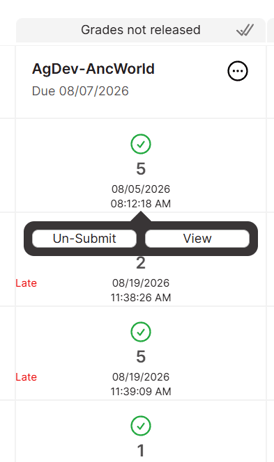
Step 1: Select the class period in which the student has turned in the essay that needs to be un-submitted.

Step 2: Locate the name of the student and assignment where the essay needs to be un-submitted.

Note: The essay needs to be in the grading que for you to be able to un-submit it. This means that the assignment needs to be active, and the icon will look this is
.
Step 3: Hover over the "submitted" icon (
) and a blue "Un-Submit" button will appear.

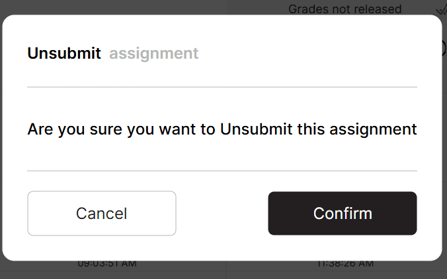
Step 4: When prompted, click the "Confirm" button to un-submit the student's essay. This will change the essay's status to "In Progress" (
)